Calendar: Difference between revisions
Jump to navigation
Jump to search
No edit summary |
No edit summary |
||
| (2 intermediate revisions by the same user not shown) | |||
| Line 5: | Line 5: | ||
The calendar lets you check the season, day and details of all the birthdays and | The calendar lets you check the season, day and details of all the birthdays and [[Events]] you've discovered. | ||
When a Birthday event is selected, it also shows you the known liked and disliked gifts for that | When a Birthday event is selected, it also shows you the known liked and disliked gifts for that [[Villagers|villager]]. | ||
}} | }} | ||
| Line 35: | Line 35: | ||
At the top of this section is the current date (Today is 1st Summer). | At the top of this section is the current date (Today is 1st Summer). | ||
Below the current date you can select a day for the [[#Season Tabs|selected season]] to see all the | Below the current date you can select a day for the [[#Season Tabs|selected season]] to see all the [[Events]] you've discovered on that day. The stars below each day represent [[Events]] you've discovered on that day. | ||
To change the selected day: | To change the selected day: | ||
| Line 42: | Line 42: | ||
*Gamepad: Left and right on the left thumbstick | *Gamepad: Left and right on the left thumbstick | ||
}} | }} | ||
[[Category:Guides]] | [[Category:Guides]] | ||
Latest revision as of 13:19, 21 August 2025
Summary

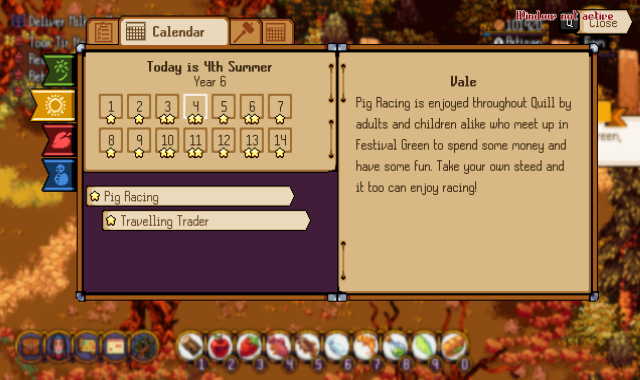
The calendar lets you check the season, day and details of all the birthdays and Events you've discovered.
When a Birthday event is selected, it also shows you the known liked and disliked gifts for that villager.
Season Tabs
The seasons tabs from top to bottom are:
- Spring
- Summer
- Autumn
- Winter
To change the selected season tab:
- Mouse: Click on the season tab
- Gamepad: Press left trigger to go up and right trigger to go down
Days
At the top of this section is the current date (Today is 1st Summer).
Below the current date you can select a day for the selected season to see all the Events you've discovered on that day. The stars below each day represent Events you've discovered on that day.
To change the selected day:
- Mouse: Click on the day
- Keyboard: Left and right arrow keys
- Gamepad: Left and right on the left thumbstick