Journal: Difference between revisions
Jump to navigation
Jump to search
No edit summary |
No edit summary |
||
| (3 intermediate revisions by the same user not shown) | |||
| Line 12: | Line 12: | ||
*Set a task as your Thatterway target | *Set a task as your Thatterway target | ||
*Remove a task that you don't want to complete | *Remove a task that you don't want to complete | ||
You can also access the [[Calendar]], [[Build Status]] and [[Event Logger]] from the Journal via the tabs at the top. | |||
}} | }} | ||
| Line 24: | Line 26: | ||
*Story Tasks: Shows tasks related to the main story | *Story Tasks: Shows tasks related to the main story | ||
*Noticeboard Tasks: Shows tasks you picked up from the [[Noticeboard]] | *Noticeboard Tasks: Shows tasks you picked up from the [[Noticeboard]] | ||
*NPC Tasks: Shows tasks you got from talking to [[ | *NPC Tasks: Shows tasks you got from talking to [[Villagers]] | ||
*Event Tasks: Shows tasks related to [[:Category:Events|events]] and [[Competitions]] | *Event Tasks: Shows tasks related to [[:Category:Events|events]] and [[Competitions]] | ||
*Miscellaneous Tasks: Shows other tasks such as feeding the animals on your farm | *Miscellaneous Tasks: Shows other tasks such as feeding the animals on your farm | ||
| Line 34: | Line 36: | ||
The Thatterway is a very useful fairy that will lead you to task destinations. | The Thatterway is a very useful fairy that will lead you to task destinations. | ||
Set the Thatterway to put that task as the currently Active one the Thatterway will lead you to. | Set the Thatterway to put that task as the currently Active one the Thatterway will lead you to. | ||
The Thatterway is very useful for [[Noticeboard]] tasks and for following the [[story]]. | |||
Latest revision as of 13:20, 21 August 2025
Summary

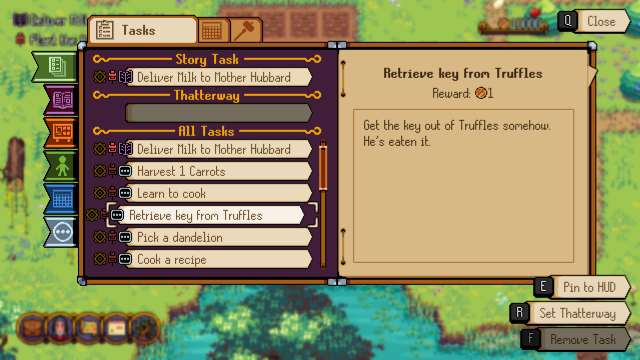
The journal lets you manage your tasks and stay up to date on their progress, in the journal screen you can:
- Check your current task list and filter the list by the type of task
- Check the details and rewards for each task in your list
- Pin tasks to the top left of your screen
- Set a task as your Thatterway target
- Remove a task that you don't want to complete
You can also access the Calendar, Build Status and Event Logger from the Journal via the tabs at the top.
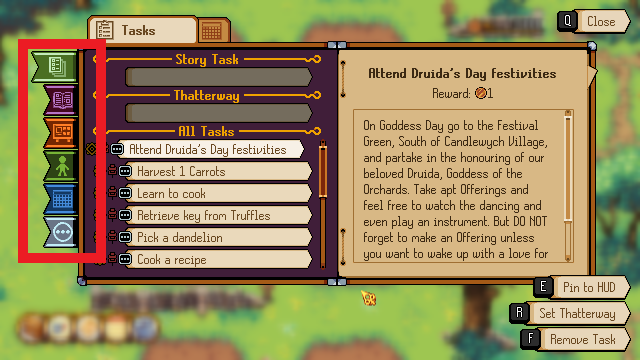
Filter Tabs

These tabs let you filter by task type, the filters are:
- All Tasks: Shows all tasks no matter the type
- Story Tasks: Shows tasks related to the main story
- Noticeboard Tasks: Shows tasks you picked up from the Noticeboard
- NPC Tasks: Shows tasks you got from talking to Villagers
- Event Tasks: Shows tasks related to events and Competitions
- Miscellaneous Tasks: Shows other tasks such as feeding the animals on your farm
Thatterway
The Thatterway is a very useful fairy that will lead you to task destinations. Set the Thatterway to put that task as the currently Active one the Thatterway will lead you to. The Thatterway is very useful for Noticeboard tasks and for following the story.